A practical guide to hiding, disguising, and styling smart devices so the tech supports the room instead of taking it over.
Smart home adoption keeps climbing, but most guides to it read like spec sheets — device names, features, comparisons. What they skip is the part homeowners actually struggle with: how to add a speaker, a hub, a video doorbell, and three smart plugs to a room without it starting to look like an electronics aisle. Below is a practical, device-by-device plan for keeping the tech and the style working together instead of against each other.
Why Smart Home Tech Usually Ruins a Room’s Look
It’s rarely the technology itself that clashes with a room’s design — it’s how it gets installed. The same handful of mistakes show up in almost every over-teched, under-styled space:
- Devices get placed for signal strength or outlet access, not visual balance.
- Stock white plastic hubs and speakers sit against warm wood or dark walls with no attempt to blend.
- Cords run visibly across baseboards and up walls instead of being routed or hidden.
- Every device is left in its default finish, even when better finish options exist.
- Tech gets added piece by piece with no overall plan, so the room ends up cluttered with mismatched gadgets.
The fix isn’t to avoid smart tech — it’s to treat each device as a design decision, not just a purchase.
1. Speakers: Treat Sound Like Furniture, Not an Accessory
Smart speakers are often the most visible offender because they’re designed to be seen and heard, not blended in. A few approaches actually work:
- Choose fabric-wrapped speakers in a neutral tone that matches your textiles instead of glossy plastic finishes.
- Use bookshelf gaps or a low console shelf to tuck a speaker between books or objects rather than placing it alone on an open surface.
- For multi-room audio, in-ceiling or in-wall speakers remove the object from view entirely — a bigger investment, but the cleanest visual result.
2. Hubs and Routers: Get Them Off the Open Shelf
Routers and smart-home hubs are almost never designed with style in mind, and they don’t need to be seen to work — they need airflow. A vented console cabinet, a decorative box with cutouts, or a closet shelf near the center of the home solves both the aesthetic and the performance problem at once.
What to avoid
Don’t fully enclose a router in an airtight box — most units need ventilation to avoid overheating and signal loss. A slatted or vented cabinet door keeps both function and looks intact.
3. Cords and Cables: Plan the Route Before You Plug In
Visible cords are one of the fastest ways to make an otherwise well-designed room look unfinished. A few low-cost fixes handle most of it:
- Paintable cord channels ($10–$20) run along baseboards or up walls and disappear once painted to match.
- A cord sleeve or braided cover bundles multiple cables behind furniture into one clean line.
- For wall-mounted displays or cameras, an in-wall cable kit routes the cord inside the wall itself for a fully cordless look.
4. Switches and Panels: Match the Finish, Not Just the Function
Smart switches, dimmers, and thermostat panels are usually sold in stock white or black — but most now come in finish options that match brushed brass, matte black, or stainless hardware already in your home. This is a small swap with an outsized visual payoff, similar to updating cabinet hardware: it’s touched and seen constantly, so mismatched finishes stand out more than their size suggests.
5. Cameras and Displays: Let Them Double as Decor
Video doorbells, security cameras, and smart displays are the hardest devices to hide because they need a clear line of sight to function. Instead of hiding them, the better strategy for 2026 interiors is choosing versions designed to blend in:
- Frame-style smart displays show rotating art or photos when idle, functioning as a piece of wall art the rest of the time.
- Cameras in matte finishes (bronze, black, white) matched to your door hardware or trim blend in far better than glossy stock finishes.
- Mount cameras at natural sightline points — near existing light fixtures or door trim — so they read as part of the architecture, not an add-on.
The Hide-It Guide: 5 Devices, 5 Fixes
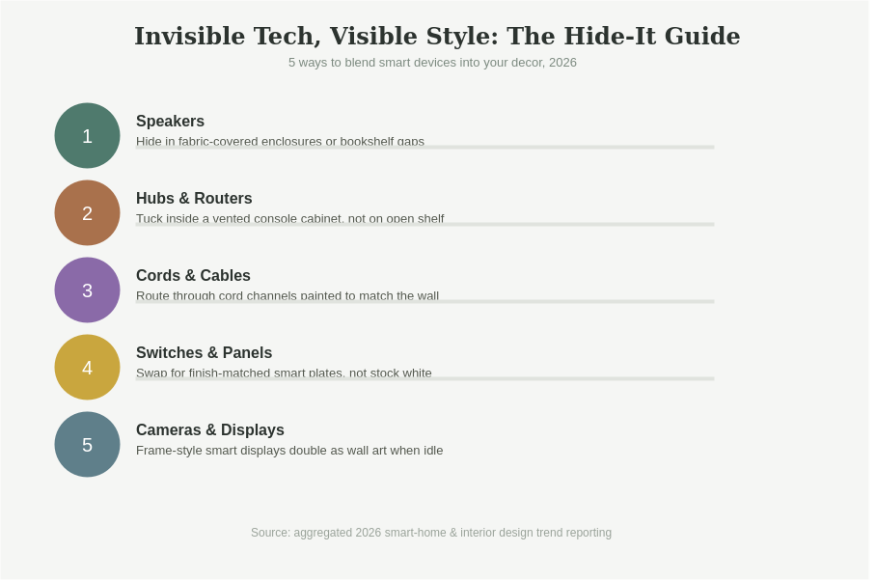
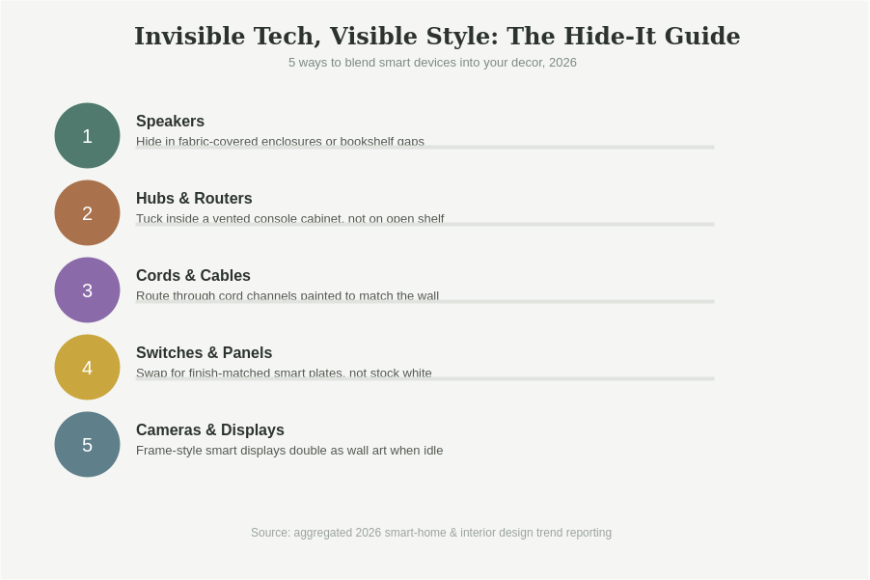
The infographic below summarizes the five most common smart devices and the fastest way to blend each one into your existing decor.
Ready to tech-proof your decor? Pick the one device in your home that bothers you most, and apply the fix for it this weekend — one clean swap makes the rest of the room feel more finished too.
A Smarter Way to Plan Smart Home Additions
Instead of buying devices one at a time as needs come up, it helps to plan additions the way you’d plan any other decor purchase — with the room’s finishes in mind first.
- Before buying, check what finish options exist for the device (many now offer 2–4 color/finish choices).
- Group new devices into a single “pass” per room instead of adding them piecemeal over months.
- Keep a short list of your home’s dominant finishes (metal tone, wood tone, wall color) and match new tech to it.
- Favor devices with companion apps that reduce visible controls — fewer physical panels means a cleaner wall.
Where Smart Tech Is Actually Heading in Home Design
Designers increasingly describe the goal as tech that supports how a room feels, not just what it does — circadian lighting that shifts color temperature through the day, climate systems that run quietly in the background, and displays that default to art rather than data. The direction for 2026 isn’t more visible technology; it’s technology that recedes into the design until you only notice it when you need it.
Want our free room-by-room smart decor checklist, including finish-matching tips for switches and hardware? Subscribe below and we’ll send it to your inbox.
Frequently Asked Questions
How do I hide smart home cords without hiring an electrician?
Paintable cord channels and braided cord sleeves handle most visible cord problems without any wiring work — both attach with adhesive strips and can be painted or matched to your wall color in an afternoon. In-wall routing for a fixed display is the only step that typically needs a professional.
Do smart switches come in finishes that match my other hardware?
Most major smart switch and dimmer brands now offer several finish options beyond stock white, including black, brass, and stainless-toned faceplates, so you can match existing hardware in the room rather than settling for the default color.
Where should I place a smart speaker so it doesn’t stand out?
A bookshelf gap, a low console shelf among other objects, or a fabric-wrapped speaker in a neutral tone all blend better than placing a glossy plastic speaker alone on an open surface. For a fully hidden option, in-ceiling or in-wall speakers remove the visible object entirely.
Is it worth buying a frame-style smart display instead of a regular tablet-style one?
If the display will live in a main living space, yes — frame-style displays are built to double as wall art when idle, which solves the biggest style complaint about smart displays: that they look like screens even when turned off.
Should I buy all my smart devices in the same brand for a consistent look?
Not necessarily for looks — brand doesn’t determine finish options, and mixing brands is common. What matters more for a cohesive look is matching each device’s finish and placement to the room, regardless of which brand made it.
Smart home technology and good design aren’t in competition — they just require the same intentional planning you’d give to any other decor decision. Treat each device’s finish, placement, and cords as design choices, and the tech disappears into a room that still looks and feels like yours.